

All devices – whether they are smart devices, laptops, and tablets – come with a feature called Low Power Mode. All devices come with a feature called Low Power Mode, which saves battery power by limiting background processes, display brightness, and other system-level processes when the battery level drops. On the iPhone, it is called Low Power Mode, and on the Android devices, it is called Battery Saver. The feature is meant to extend the battery life of the devices as much as possible.
This guide is a compilation of everything on the subject, including the technical workings of the device, differences between countries, differences between brands, myths, effects on the battery, travel, emergency use, and the future This guide provides a compilation of everything around the subject: ‘for use during travel, emergencies, and future use’ and everything in between.
Table of Contents
What Is Low Battery Mode?
Low Battery Mode is a system-level power management feature that temporarily reduces power usage.
It is designed to:
- Extend remaining battery time
- Reduce background activity
- Lower screen brightness
- Limit processor performance
- Pause non-essential syncing
It activates automatically around 20% (varies by device) or can be turned on manually anytime.
Why Low Battery Mode Is Essential in 2026
Low battery mode has evolved from a simple emergency feature into a daily battery optimization tool used worldwide. With increasing reliance on smartphones for banking, navigation, work, and communication, battery efficiency is now critical.
Globally, users in regions with unstable electricity supply, such as parts of Asia, Africa, and rural areas, depend heavily on low battery mode to extend device usability. Even in developed countries, users activate low battery mode on iPhone 17 and Android devices during travel, long workdays, or heavy app usage.
Additionally, modern smartphones with high refresh rate displays, 5G connectivity, and AI-based apps consume more power, making battery-saving modes more relevant than ever.
| Region | Average Daily Screen Time | Battery Drain Level | Low Battery Mode Usage |
| India | 6–8 hours | High | Very Common |
| USA | 5–7 hours | Moderate | Common |
| Europe | 4–6 hours | Moderate | Moderate |
| Africa | 5–7 hours | High | Essential |
| Southeast Asia | 7–9 hours | Very High | Very Common |
Increased dependence on smartphones globally
- Higher battery drain due to 5G and apps
- Essential in power shortage regions
- Used proactively, not just at 20%
How Low Battery Mode Works (Technical Breakdown)
Low Battery Mode adjusts multiple hardware and software systems at once.
| System Layer | What Changes | Battery Impact |
| CPU/GPU | Reduces peak processing speed | Saves energy & reduces heat |
| Display | Lowers brightness & refresh rate | Major power savings |
| Background Apps | Pauses refresh & sync | Prevents hidden drain |
| Connectivity | Limits 5G/background data | Reduces radio usage |
| Animations | Reduces motion effects | Minor savings |
| Auto-Lock | Shortens timeout | Prevents idle drain |
The biggest battery consumers globally are:
- Display
- Processor
- Mobile data / 5G radios
- Background apps
Low Battery Mode directly targets these areas.
Visual Breakdown: What Happens When You Turn On Low Battery Mode
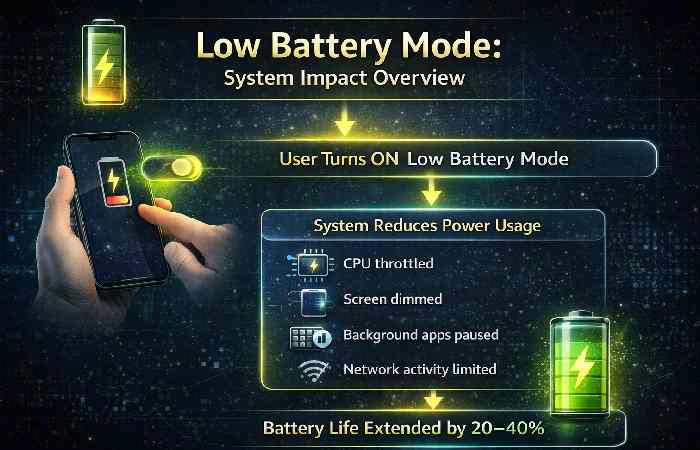
| System Component | Before | After Enabling |
| CPU Speed | 100% | 60–80% |
| Brightness | High | Reduced |
| Background Apps | Active | Restricted |
| Notifications | Instant | Delayed |
| Network Usage | Full | Optimized |
Low Battery Mode on iPhone (Low Power Mode)
What Changes on iOS
| Feature | Behavior |
| 5G | Disabled in most cases |
| Background App Refresh | Turned off |
| Mail Fetch | Paused |
| Auto-Lock | 30 seconds |
| Visual Effects | Reduced |
| Screen Refresh Rate | Limited (120Hz → 60Hz) |
How to Enable (iPhone)
- Settings
- Battery
- Toggle Low Power Mode
Official Apple Guide:
https://support.apple.com/en-us/HT205234
Battery health info:
https://support.apple.com/en-us/HT208387
Does Low Power Mode Save Battery on iPhone?
Yes, Low Power Mode on iPhone significantly saves battery by reducing system activities. Many users ask: “Does Low Power Mode save battery on iPhone?” — the answer is yes, especially in standby and light usage scenarios.
On devices like Low Battery Mode iPhone 17, Apple has improved optimization using AI-based power management.
| Activity | Without Low Power Mode | With Low Power Mode |
| Video Streaming | 5–6 hours | 6–8 hours |
| Browsing | 6 hours | 7–9 hours |
| Standby | 24 hours | 36+ hours |
| Gaming | High drain | Slight improvement |
Low Battery Mode on Android (Battery Saver)
What Changes on Android
| Feature | Behavior |
| Background activity | Restricted |
| Location services | Limited |
| 5G | May switch to LTE |
| Sync | Paused |
| Dark mode | Often enabled |
| Animations | Reduced |
How to Enable
- Settings
- Battery
- Battery Saver
Official Android Guide:
https://support.google.com/android/answer/7664692
Developer battery optimization info:
https://developer.android.com/topic/performance/power
Low Battery Mode on Samsung and Android Devices (Advanced Guide)
For low battery mode Samsung and Android, features vary by manufacturer.
Samsung offers custom power saving levels, while stock Android focuses on adaptive battery.
| Brand | Feature Name | Unique Feature |
| Samsung | Power Saving Mode | CPU limit + brightness control |
| OnePlus | Battery Saver | App optimization |
| Xiaomi | Ultra Battery Saver | Minimal UI |
| Google Pixel | Adaptive Battery | AI-based learning |
Points
- Samsung allows manual customization
- Android adapts based on usage patterns
- Xiaomi offers extreme saving mode
- Pixel uses AI prediction
Battery Extension: How Much Does It Really Help?
| Usage Type | Battery Extension |
| Light usage | +2–4 hours |
| Moderate usage | +1–3 hours |
| Heavy gaming | Limited impact |
| Standby | Significant increase |
Effectiveness depends on signal strength, screen usage, and app behavior.
Low Battery Mode Around the World
Low battery mode iphone
Network Impact on Battery Drain
| Network Type | Battery Consumption | Common Regions |
| 3G | Moderate | Rural areas globally |
| 4G LTE | Balanced | Most countries |
| 5G Sub-6 | Higher | US, Europe, India |
| 5G mmWave | Very High | Select cities |
- Weak signal = higher battery drain.
- Low Battery Mode reduces background network strain.
Climate Impact on Battery Performance
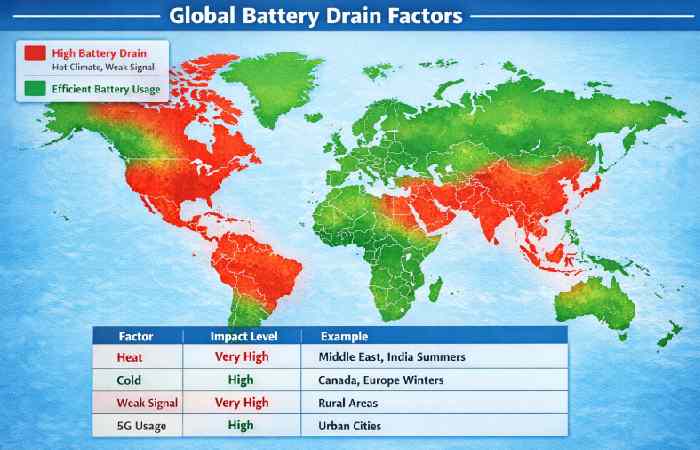
| Condition | Effect | Recommendation |
| Hot (35°C+) | Faster degradation | Use Low Battery Mode |
| Cold (<0°C) | Temporary drop | Keep device warm |
| Desert heat | Rapid overheating | Avoid sunlight |
| High humidity | Long-term risk | Avoid heat buildup |
Apple temperature guide:
https://support.apple.com/en-us/HT201678
Brand Differences (Global Manufacturers)
| Brand | Feature Name | Special Behavior |
| Apple | Low Power Mode | Reduces refresh & 5G |
| Samsung | Power Saving Mode | Adjustable CPU limits |
| Xiaomi | Battery Saver | Aggressive app control |
| Oppo | Super Power Saving | Minimal apps |
| Huawei | Power Saving | AI battery learning |
| Pixel | Battery Saver | Adaptive battery |
Low Battery Mode vs Normal Mode
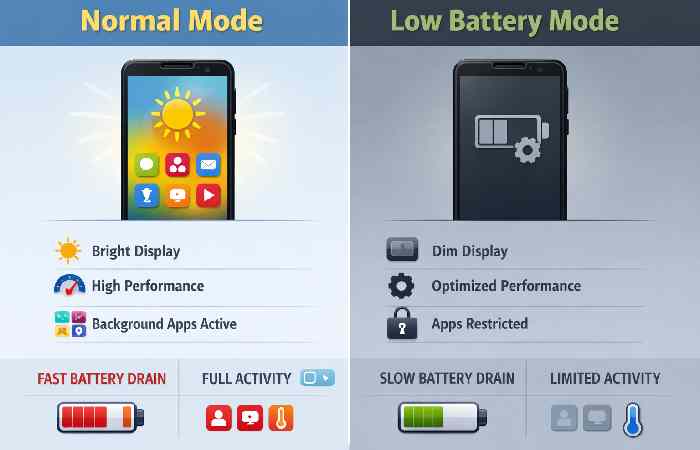
| Feature | Normal | Low Battery Mode |
| Performance | Full | Slightly reduced |
| Refresh Rate | 120Hz | 60Hz |
| Background Sync | Active | Paused |
| Brightness | Manual | Reduced |
| Battery Life | Standard | Extended |
Travel and International Usage
Battery drains faster during:
- Roaming
- GPS navigation
- Weak signal zones
- Frequent camera use
Travel Strategy
| Situation | Action |
| Airport waiting | Turn it on |
| Roaming abroad | Disable background data |
| Hiking | Activate early |
| Long flights | Use Airplane Mode |
Emergency & Disaster Scenarios
In disasters or power outages, conserving battery is critical.
| Situation | Why It Matters |
| Earthquakes | Communication access |
| Floods | Emergency alerts |
| War zones | Connectivity |
| Rural power outages | Limited charging access |
Low Battery Mode should be activated immediately.
Power Infrastructure Differences
| Region Type | Charging Reliability | Importance |
| Developed cities | Stable | Moderate |
| Rural areas | Less stable | High |
| Developing regions | Power cuts common | Very High |
Common Myths
| Myth | Reality |
| It damages battery | False |
| Makes phone extremely slow | Slight slowdown only |
| Only use below 20% | Can use anytime |
| Stops calls | No |
| Blocks internet | No |
Advanced Battery Optimization Tips
- Lower brightness manually
- Turn off Bluetooth when unused
- Use Dark Mode (OLED screens benefit)
- Disable unused location services
- Avoid weak signal areas
- Close high-drain apps
Low Battery Mode on Laptops
Windows Battery Saver
Resource Link: https://support.microsoft.com/windows
| Feature | Behavior |
| Background apps | Limited |
| Screen brightness | Reduced |
| CPU | Managed |
macOS Low Power Mode
Resource Link: https://support.apple.com
Available on MacBooks to extend battery runtime.
Environmental & Sustainability Impact
- Low Battery Mode contributes to:
- Lower charging frequency
- Reduced energy consumption
- Slight carbon footprint reduction
- Reduced heat generation
When millions use power-saving features, global energy savings accumulate.
Future of Battery Optimization
| Innovation | Impact |
| AI battery prediction | Smarter optimization |
| Solid-state batteries | Longer lifespan |
| Energy-efficient chips | Lower drain |
| Adaptive refresh rates | Dynamic savings |
| Smart charging algorithms | Health protection |
Should You Keep It On All the Time?
Pros:
- Longer battery life
- Less heat
- Reduced background drain
Cons:
- Slight performance reduction
- Lower refresh rate
- Delayed notifications
Best practice: Use when needed, not permanently.
Best Time to Use Low Battery Mode (Smart Usage Strategy)
| Situation | Recommendation |
| Battery above 50% | Optional |
| Battery 30–50% | Recommended |
| Below 20% | Essential |
| Traveling | Always enable |
| Gaming | Limited benefit |
- Use early during travel
- Enable in weak network areas
- Combine with airplane mode for max savings
Hidden Battery Drainers You Must Know
| App Type | Battery Impact |
| Social Media | High |
| GPS Apps | Very High |
| Streaming Apps | High |
| Background Sync Apps | Moderate |
Even with low battery mode enabled, some apps continue to drain power. Identifying these apps is critical for maximizing efficiency globally.
Final Takeaway
Final Takeaway The battery saving feature is among the most useful and practical features on modern electronics. The feature works and is useful across the globe, and it empowers users to provide for themselves in case of emergencies. The battery saving feature is useful for those in areas with unreliable power sources and those in need of a feature to keep their device charged for the day.
The battery saving feature is attributed to the charge-saving functionality as it reduces and manages the processor load, reduces the display performance, reduces background apps and network connectivity, and works to conserve the battery charge. You are able to use your device more intelligently by knowing how the battery saving feature works. This battery saving feature will enable you to prolong the life of the battery at the most critical times.