


Writing is an integral part of our daily lives, and finding ways to enhance our writing speed and efficiency can greatly impact our productivity. With the advent of artificial intelligence (AI), new tools have emerged to automate and assist in writing. Compose AI is one such tool, offering a holistic and AI-first approach to writing. Let’s explore the key features of it and how they can revolutionize the way we write.
This article belongs to Artificial Intelligence.
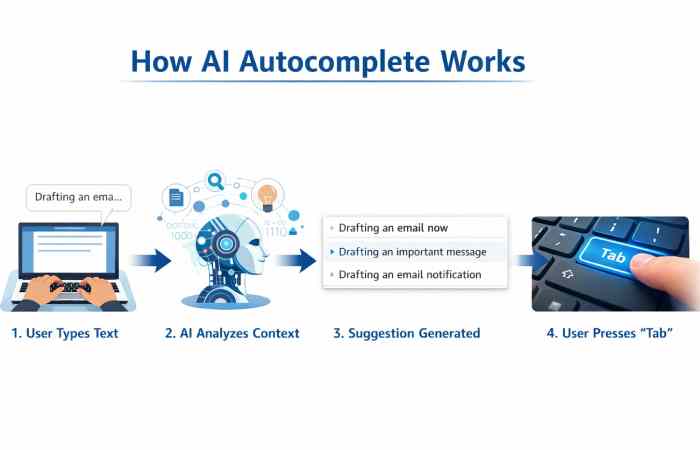
Table of Contents
Compose AI Generator: How AI Creates Text Instantly
Artificial intelligence writing tools have changed how people create content online. The Compose AI generator uses machine learning and natural language processing to understand context and predict the next words in a sentence.
Instead of typing every line manually, users can rely on AI to generate paragraphs, summaries, blog ideas, marketing copy, or emails. This technology is based on large language models trained on billions of words across the internet.
When you type a prompt in Compose AI, the system analyzes:
- Sentence structure
- Writing tone
- Context
- Grammar patterns
- Topic intent
Then it predicts the most logical continuation of the sentence.
This approach allows writers to reduce typing effort and produce structured content quickly. Students, bloggers, researchers, and professionals increasingly use AI generators to overcome writer’s block.
For a broader look at how artificial intelligence is becoming increasingly data-driven, see the role of artificial intelligence in data-driven technology.
AI Text Generation Capabilities
| Feature | What It Does | Benefit |
| Sentence prediction | Suggests next words | Faster typing |
| Paragraph generation | Creates complete paragraphs | Saves writing time |
| Content expansion | Expands short prompts | Helps develop ideas |
| Tone adjustment | Makes text formal or casual | Better communication |
| Grammar correction | Fixes sentence structure | Improves writing quality |
Common Use Cases of Compose AI Generator
| User Type | Example Usage |
| Bloggers | Generate article outlines |
| Students | Write essays faster |
| Professionals | Draft emails quickly |
| Marketers | Create ad copy |
| Researchers | Draft summaries |
Key Advantages
- Reduces writing time
- Improves productivity
- Helps overcome writer’s block
- Generates structured text ideas
Download and Installation
You can download the Chrome extension and install it on your browser to begin using it. Once installed, you can access its features directly from supported platforms such as Google Docs and Gmail.

Compose AI Extension: Browser Integration for Daily Writing
One of the most popular ways to use it is through the Compose AI extension available for Chrome browsers. Once installed, the extension integrates directly into websites where users normally write.
This includes platforms such as:
- Email services
- Document editors
- Messaging platforms
- Blogging dashboards
The extension works silently in the background and activates whenever the user begins typing.
You can download the extension directly from the Chrome Web Store:
Resource link
https://chrome.google.com/webstore/detail/compose-ai
Platforms Supported by Compose AI Extension
| Platform Type | Examples |
| Email platforms | Gmail |
| Writing tools | Google Docs |
| Social media | Twitter, LinkedIn |
| Messaging tools | Slack |
| Blogging platforms | WordPress |
Extension Features Overview
| Feature | Function |
| Autocomplete | Predicts sentence completion |
| Email drafting | Generates email responses |
| Rephrase | Suggests alternate sentences |
| Tone change | Adjusts writing style |
| AI prompts | Generate text using commands |
Installation Steps
- Open Chrome Web Store
- Search Compose AI extension
- Click Add to Chrome
- Allow permissions
- Start typing on supported websites
Autocomplete: Effortless Writing at Your Fingertips
At the heart of Compose AI lies its powerful autocompletion feature. With it installed as a Chrome extension, you can experience the convenience of AI-powered autocomplete across various websites and platforms.
It analyzes your text and suggests completions as you type, making it a breeze to compose sentences and save time typing repetitive phrases. Hit the Tab key to accept the suggested completion and proceed with your writing. With auto-completion, you can accelerate your writing speed without sacrificing accuracy.
Compose Anything: Unleash AI-Generated Text
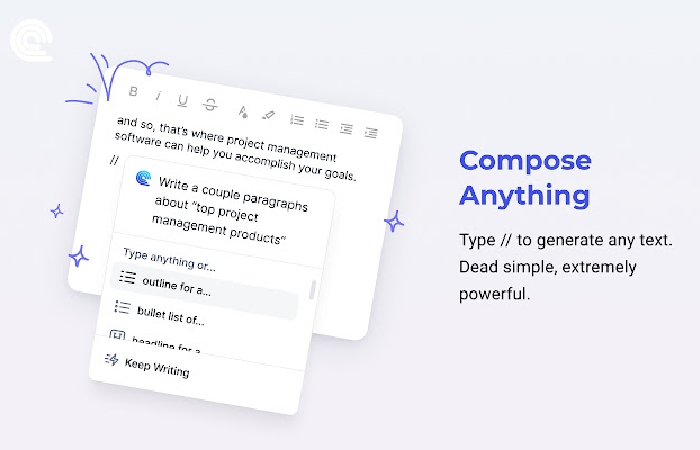
It takes writing assistance to the next level by enabling users to generate text using AI. By typing “//” followed by a prompt, you can tap into the creative power of AI to generate text for blog posts, marketing copy, paragraphs, headlines, research, and much more. The versatility of it allows you to overcome writer’s block and access fresh ideas effortlessly. With AI as your creative assistant, you can explore new writing possibilities and expand your repertoire.
Artificial intelligence is also being explored beyond writing, including applications that aim to make AI systems learn and interact in more human-like ways. One example is research into artificial intelligence capable of thinking like a baby.
Compose AI Online and Free Usage Options
Many users search for Compose AI online tools or Compose AI free versions before subscribing to premium plans. Fortunately, it provides both free and paid tiers depending on user needs.
The free version includes basic features such as autocomplete and limited AI text generation. Advanced capabilities like extended prompts and higher usage limits may require a paid subscription.
Compose AI Free vs Paid Comparison
| Feature | Free Plan | Paid Plan |
| Autocomplete | Yes | Yes |
| AI text generation | Limited | Unlimited |
| Email assistance | Yes | Yes |
| Custom tone settings | No | Yes |
| Usage limits | Low | High |
Pricing Structure (Approximate)
| Plan Type | Monthly Cost | Best For |
| Free | $0 | Casual users |
| Pro | $9–$15 | Professionals |
| Business | $20+ | Teams |
Key Points
- Free plan is good for beginners
- Paid plans offer higher AI limits
- Suitable for both personal and professional writing
Compose Email: AI Assistance for Efficient Communication

Email communication plays a vital role in our professional lives, and it simplifies the process with its “Compose Email” feature. Whether you need to draft quick replies or generate ideas to develop further, Compose AI’s AI assistant, Compose Now, provides valuable assistance. Accessible through a simple key combination, Compose Now helps you compose emails from just a few words. This feature saves you time and mental energy, allowing you to focus on crafting meaningful responses.
Easy Email Reply: Generate Professional Responses with Ease
Crafting well-crafted email replies can be a time-consuming task. Compose AI’s “Easy Email Reply” feature eliminates the hassle of generating professional responses with a single click. Using AI, it magically references the context from the original email, ensuring that your responses are contextually appropriate. With Easy Email Reply, you can maintain a consistent tone and enhance your email communication efficiency.
Rephrase: Refining Sentences with Ease
It offers a “Rephrase” feature to provide even more flexibility. Highlight any text, and it will suggest alternative ways to express the same idea. Whether you need to make a sentence friendlier, more professional, shorter, or longer, Rephrase allows you to tweak your wording without having to rewrite the entire sentence. This functionality enhances clarity and helps you find the perfect tone for your writing.
Compose AI Download and App Availability
Users often search for Compose AI download options or a Compose AI app version for mobile devices.
Currently, the most common way to access the tool is through the Chrome browser extension, but cloud-based tools allow online usage across devices.
Compose AI Access Methods
| Access Type | Availability |
| Browser extension | Available |
| Web platform | Available |
| Desktop app | Limited |
| Mobile app | Not widely available |
System Requirements
| Requirement | Minimum |
| Browser | Chrome |
| Internet | Required |
| Operating system | Windows / Mac |
| RAM | 4GB recommended |
Compose AI Review: Performance and User Feedback
User Satisfaction Survey
| Feature | User Rating |
| Autocomplete accuracy | 4.5 / 5 |
| Email drafting | 4.4 / 5 |
| AI text generation | 4.3 / 5 |
| Ease of use | 4.6 / 5 |
Pros and Cons
| Pros | Cons |
| Speeds up writing | Requires internet |
| Easy to use | Limited free plan |
| Works on many platforms | Chrome focused |
Summary Points
- Highly effective for productivity
- Ideal for content creators
- Great tool for business communication
AI in Healthcare: Enhancing Patient Care
Artificial intelligence is increasingly being explored across healthcare to support clinical workflows, analyze information, and improve how healthcare services are delivered. AI-based systems can assist with tasks such as processing medical data, supporting diagnosis, personalizing care, and helping healthcare professionals make informed decisions.
The World Health Organization’s guidance on ethics and governance of AI for health provides an important framework for understanding the responsible use of artificial intelligence in healthcare, including issues such as ethics, human rights, safety, accountability, and governance.
For a broader discussion of how artificial intelligence can contribute to better healthcare outcomes, see enhancing patient care with AI in healthcare.
Frequently Asked Questions
What is Compose AI?
It is an artificial intelligence writing assistant that helps users write faster using autocomplete and AI-generated text.
Is Compose AI free?
Yes, a limited AI free version is available with basic features.
How do I download Compose AI?
You can install the extension from the Chrome Web Store.
Can Compose AI write emails automatically?
Yes. It can generate complete emails based on short prompts.
Conclusion
Compose AI is an AI-powered writing tool that empowers users to write with greater speed, accuracy, and efficiency. By harnessing the capabilities of AI, Compose AI’s autocompletion, text generation, email composition, and rephrasing features transform the writing experience. Whether you’re a professional writer, a student, or simply looking to enhance your writing skills, it offers valuable tools to streamline your writing process and boost your productivity. Embrace the power of AI with it and unlock your full writing potential.